Project Management for IT Services Companies
Weenvo is project management software for IT services companies: software houses and outsourcers that deliver fixed-scope projects and support retainers. Sprints run on the board with estimate against actual, developers log hours in the task they close, the team lead approves the week, and the account manager invoices from approved hours. Each client has a workspace and a request form.
Key benefits
Estimate against actual on every task
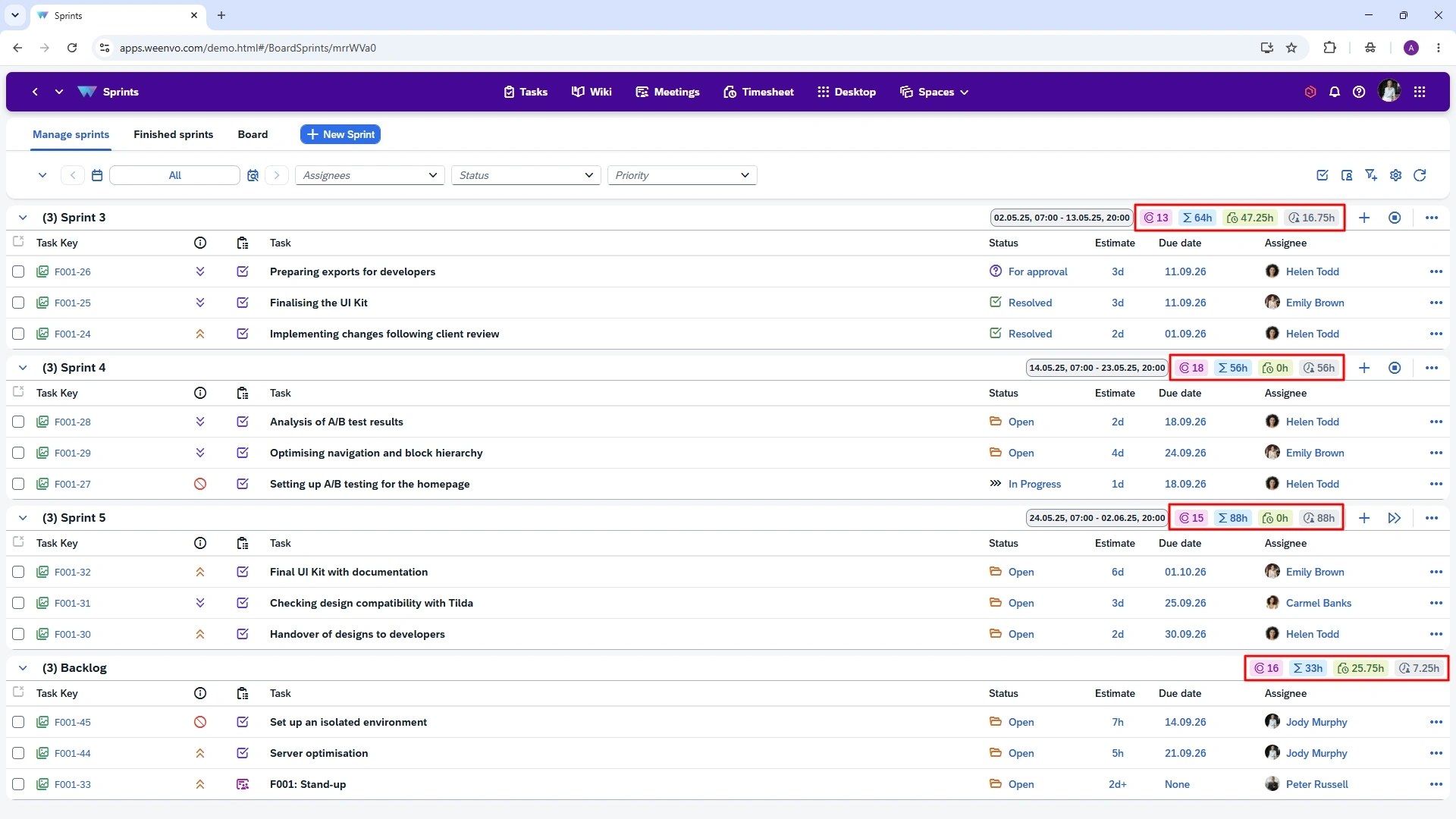
A task carries its estimate and the time spent. The delivery manager sees which work packages are overrunning during the sprint, not after the invoice is disputed.
Hours approved before invoicing
Developers log hours in the task card. The team lead accepts or returns the week’s timesheet, the period locks, and the account manager builds the invoice from hours that have already been checked.
A client workspace with their own requests
The client contact logs into their own workspace, sees the board and the documentation, and sends support requests through a form; the team creates a task from each submission and attaches the form to it. Nothing from other clients is visible.
Sprints with the team’s own task types
A scheme per client sets the task types, bug, feature, support request, and the statuses the team actually uses. A sprint board is a board that shows the tasks planned for one sprint, with the backlog beside it.
How a software house runs a client sprint and a support retainer
A software house with a few dozen engineers across several client teams runs two kinds of work for each client, and in Weenvo both live in the client’s workspace.
The fixed-scope project
A new client’s project is created from the scheme for fixed-scope work: task types feature, bug and technical debt, statuses from backlog to released. The scope arrives as a spreadsheet of user stories and is imported with the Excel template in Projects and tasks, each story with its estimate. The team plans a two-week sprint from the backlog, starts it, and the sprint board shows what is in flight. A developer closes a task and logs the hours in the same card. When time spent passes the estimate on a story, the delivery manager sees it on the board and talks to the client before the sprint review, not after.
The support retainer
The same client has a retainer: a monthly allowance of hours for fixes and small changes. A retainer is an agreement in which the client pays for a fixed number of hours each month and the team works them off as requests arrive. The client contact sends requests through a form in the workspace; the team lead creates a task of type support request on the retainer board for each one, with the form attached and its own deadline. Hours logged on those tasks are reported by project for the month, so the account manager sees on the twentieth that the allowance is nearly used and warns the client before it runs out.
Friday
The team lead opens the weekly timesheet in Time tracking and timesheets grouped by client, returns one entry logged on the wrong project, accepts the rest. The period locks. On the first of the month the account manager exports approved hours by client and project to Excel and raises the invoice from it: project hours at the fixed scope, retainer hours against the allowance.
The sprint review
The sprint review is a meeting in Meetings with the client contact invited: agenda items with owners, decisions typed in during the call, minutes sent afterwards. A decision to change scope becomes a task in the backlog with the date set.
Documentation
Documentation for the client, the architecture overview, the runbook for the production environment, the release notes per sprint, lives in Documentation inside the client’s workspace, with version history, so the engineer on call at the weekend reads the current runbook, not the one from the last contract.
Use cases
Fixed-scope project
Stories imported from Excel with estimates, sprints on the board, estimate against actual per story. See client projects in Weenvo.
Support retainer
Requests from the client through a form, a task created per request with the form attached and a deadline, hours per month against the allowance.
Onboarding a new client team
A workspace, a scheme, a request form and a documentation section created in an afternoon, with the client contact invited in a limited role.
Technical documentation per client
Architecture, runbooks and release notes next to the board, with versions and access per section. See company knowledge base.
What you stop stitching together
The Jira comparison gives the feature-by-feature view and the cost for 30 users.
Sprints, backlog and hours in the task card on every plan
Instead of: Jira for sprints, Tempo for time.
Documentation inside each client’s workspace, with version history
Instead of: Confluence for technical docs.
Timesheets with approval and locked periods in the same product as the tasks
Instead of: A separate timesheet tool with its own approval.
The client reads the board and the sprint review minutes in their own workspace
Instead of: A status email to the client every Friday.
Weenvo applications
Projects and tasks
Boards, sprints and backlog, estimate against actual, a scheme per client, Excel import of stories.
Time tracking and timesheets
Hours in the task card, weekly approval, locked periods, reports by client and project.
Documentation
Architecture, runbooks and release notes per client, version history.
Meetings
Sprint reviews and client calls with recorded decisions.
Forms
Support requests from the client, attached to the task the team creates; a satisfaction survey at the end of a project.
Company portal and workspaces
A workspace per client with its own roles and menu.
API
Tasks, projects, users and timesheets for scripts that link Weenvo to the repository tooling.
Cost
Free: up to 10 users with every feature. Standard: €10 per user per month, 10 GB of storage, 15% off on annual billing. A team of 40 users on Standard pays €340 a month on annual billing or €400 billed monthly. Client contacts invited into their workspace are users too. Full details on the pricing page. Last checked 2 November 2026.
Free
0 EUR per user per month
- Up to 10 users
- 50 MB storage
- Every feature
- No credit card
Standard
10 EUR per user per month
- 10 GB storage
- Every feature
- 15% off on annual billing
See Weenvo in Action
Want to see how these features work in practice? Explore how Weenvo can help your business.
FAQs
Does Weenvo have sprints and a backlog?
Yes, on every plan. A backlog is planned, a sprint is started and closed, and the board shows the sprint’s tasks with the team’s own statuses. There is no limit on the number of sprints or boards.
Can developers log time on tasks?
Yes. Each task carries an estimate and the time spent. A developer logs hours in the task card, and the timesheet collects them by day, week or month for approval.
Can a client see only their project?
Yes. A workspace per client holds only that client’s projects, documents and request form. The client contact is invited with a limited role and sees that workspace only.
Can we import issues from Jira?
Yes. Export issues from Jira to CSV, open the file in Excel and load tasks, users and projects through Weenvo’s Excel templates, with validation and a log. Comments and attachments are copied by hand.
Does Weenvo integrate with Git or CI?
Weenvo holds the tasks, the hours, the documentation and the decisions; commits and pipelines stay in the repository tool. The API, on every plan, covers tasks, projects, users and timesheets, so a script can close a task when a pull request is merged.
What does it cost for a team of 40?
€340 a month on annual billing, or €400 billed monthly, with every feature and 10 GB of storage. Up to 10 users are free; from the eleventh user, Standard applies to everyone.
Ask a Question
Specify the details of how you plan to use our solution suite or any individual product. If your organisation has unique processes and requires an Enterprise‑level implementation, you can also submit a request for a customised setup that supports more efficient workflows.
Thank you for contacting us. Our support will answer you as soon as possible!