Timesheet Data for Payroll and Invoicing
Weenvo gives a finance team timesheet data it can build payroll and client invoices from: hours logged in tasks, approved weekly by team leads, locked for the period, and exported to Excel by client, project and employee. Rates are kept in the employee personal account. The API pulls approved hours into the accounting system on every plan.
Key benefits
Approved before exported
Timesheet approval is the step in which a team lead accepts or returns each person’s week before the hours count. Finance never sees an hour that nobody has checked.
Periods lock
A locked period is a week or a month whose approved hours can no longer be edited. Once finance has exported, the figures the invoice and the payroll were built on stay as they were.
One export by client, project and employee
The month’s approved hours go to Excel in one export, grouped by client and project for invoicing, by employee for payroll, by project category for billable against internal time.
API for accounting
The API, on every plan, reads approved timesheets and employee data, so the accounting system pulls the month on a schedule instead of someone re-typing it.
Month end for finance: from approved hours to payroll and invoices
A service company that bills most of its clients by the hour and pays part of its staff hourly runs month end in Weenvo like this.
During the month
Consultants, engineers and designers log hours in the task they work on in Time tracking and timesheets. Every project has a category, client work or internal, set in the scheme, so billable and internal time are separated at the source, not in a spreadsheet afterwards.
Every Friday
Team leads open the weekly timesheet for their people, return anything that needs a note, accept the rest. The question "who approved this" has an answer on every entry: the approver and the date.
The first working day
The finance manager locks the previous month. From this moment no hour in it can change. Then one export goes to Excel: hours by client and project for the invoices, hours by employee for the payroll, hours by project category for the split between billable and internal time.
Invoices
Each client’s invoice is raised in the accounting system from the hours by project. When a client disputes a line, finance traces it in Weenvo to the task, the date, the person and the approver.
Payroll
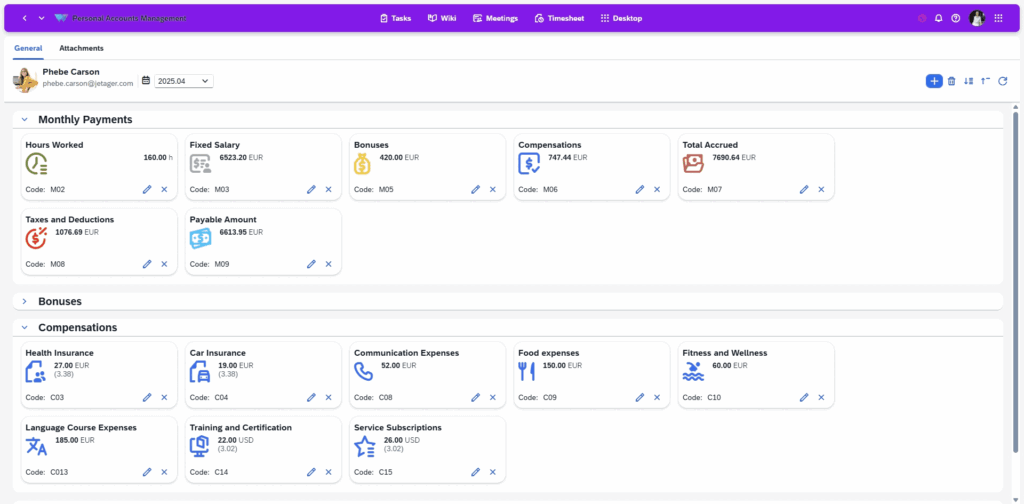
Hourly staff are paid from the hours by employee. The salary or hourly rate is in each employee’s personal account, together with payments, bonuses, sick leave and holiday, so the payroll check reads rates and hours from one source. Cost per project is computed in Excel from the hours export and the rates.
Finance as a reader
The finance team has a role that reads timesheets, reports and exports across all workspaces without editing a single hour. Team leads approve; finance locks and exports.
Automation
Where the accounting system can call an API, it pulls the approved hours and the employee list from Weenvo on the first of the month; the Excel export stays as the fallback and the audit copy.
Use cases
Client invoicing from hours
Approved hours by client and project, locked for the month, exported in one file. See time tracking and timesheets.
Payroll for hourly staff
Hours by employee from the same export, rates from the personal account. See employee personal account.
Project cost from rates
Hours per project and the rate per employee give the cost of a project in Excel; estimate against actual on the tasks shows where it moved. See Weenvo for consulting firms.
Audit trail
Every hour carries its task, date, person, approver and approval date, and locked periods do not change. See the API for pulling the trail into the accounting system.
What this replaces
Hours logged in tasks, approved weekly, exported in one file
Instead of: Hours collected in each team’s spreadsheet and re-typed.
Each entry has its approver and date
Instead of: Approvals by email, with no record of who approved what.
Periods locked after approval
Instead of: Changes to hours after invoicing.
Salary or hourly rate in the employee personal account
Instead of: Rates in a separate HR file.
Excel export or API pull
Instead of: Re-typing into the accounting system.
Weenvo applications
Time tracking and timesheets
Hours per task, weekly approval or return, period lock, reports by client, project, employee and project category.
Employee personal account
Salary or hourly rate, payments, bonuses, sick leave and holiday per employee.
Data import and export
Timesheets, users and projects to and from Excel.
API
Approved timesheets and employee data for the accounting system, on every plan.
Projects and tasks
Project categories for billable and internal time, estimates per task.
Cost
Every feature, including timesheet approval, locked periods and the API, is on every plan. Free: up to 10 users. Standard: €10 per user per month, 10 GB of storage, 15% off on annual billing. Enterprise for 100 users or more on request, with invoice billing for legal entities. Full details on the pricing page. Last checked 2 November 2026.
Free
0 EUR per user per month
- Up to 10 users
- 50 MB storage
- Every feature
- No credit card
Standard
10 EUR per user per month
- 10 GB storage
- Every feature
- 15% off on annual billing
Enterprise
On request
- 100 users or more
- 100 GB storage and above
- Unlimited change history
- Invoice billing for legal entities
See Weenvo in Action
Want to see how these features work in practice? Explore how Weenvo can help your business.
FAQs
Can we export approved hours by client and project?
Yes. Timesheets export to Excel for any period, grouped by client, project, employee or project category.
Can hours be locked after approval?
Yes. A period is locked once accepted, so entries cannot change after the export.
Where are employee rates kept?
In the employee personal account, together with payments, bonuses, working hours, sick leave and holiday.
Does Weenvo issue invoices?
Weenvo produces the approved hours the invoice is built from, by client and project, locked and exported to Excel or pulled through the API. The invoice itself is raised in the accounting system, in its currency.
Can we pull the data automatically?
Yes. The API is on every plan; the accounting system pulls approved hours and employee data on a schedule.
Can finance see hours without editing them?
Yes. Access is set per role and workspace; a reading role sees the timesheets, reports and exports across the company without changing an entry.
Ask a Question
Specify the details of how you plan to use our solution suite or any individual product. If your organisation has unique processes and requires an Enterprise‑level implementation, you can also submit a request for a customised setup that supports more efficient workflows.
Thank you for contacting us. Our support will answer you as soon as possible!