
Data Import and Export
A simple way to import data into Weenvo and export it to Excel. Use ready-made templates to quickly transfer data from external systems, keep information up to date, and share it with colleagues.
Functionality
Everything you need to import, update and export data
|
|
See Weenvo in Action
Want to see how these features work in practice? Explore how Weenvo can help your business.

Users
Keep user data up to date across systems
Users
Keep user data up to date across systems
Importing from a ready-made Excel template lets you quickly transfer employee data and create accounts without manual entry. Exporting provides an up-to-date list of users in a convenient format, making it easy to track changes or use the data in HR processes.
Projects
Move projects with all key attributes
Importing from Excel allows you to transfer the complete project structure, including names, statuses, managers and other attributes. Exporting provides a complete list of projects with their attributes, making it convenient for checking data and further use.

Projects
Move projects with all key attributes
Importing from Excel allows you to transfer the complete project structure, including names, statuses, managers and other attributes. Exporting provides a complete list of projects with their attributes, making it convenient for checking data and further use.

Tasks
Move your team’s work between systems
Tasks
Move your team’s work between systems
Timesheets
Preserve your time tracking history
Importing timesheets preserves your time tracking history and allows you to transfer data from other systems without manual processing. Exporting provides detailed time records for a selected period, making it convenient for checking, approving and preparing reports.

Timesheets
Preserve your time tracking history
Importing timesheets preserves your time tracking history and allows you to transfer data from other systems without manual processing. Exporting provides detailed time records for a selected period, making it convenient for checking, approving and preparing reports.

Personal Account
Exchange employee payment data between systems
Importing personal account data loads employee earnings, payments and other information for a selected period. Exporting provides detailed payroll data that can be used to analyse costs, prepare reports or transfer information to accounting and HR systems.
Personal Account
Exchange employee payment data between systems
Importing personal account data loads employee earnings, payments and other information for a selected period. Exporting provides detailed payroll data that can be used to analyse costs, prepare reports or transfer information to accounting and HR systems.
Excel Templates
Prepare data for accurate import
Excel templates help you enter data in the required structure and reduce the risk of errors during import. Templates are available for users, projects, tasks, timesheets and personal account data. Download the required template, fill it in according to the example and upload it to Weenvo. The system will validate the file before importing the data.
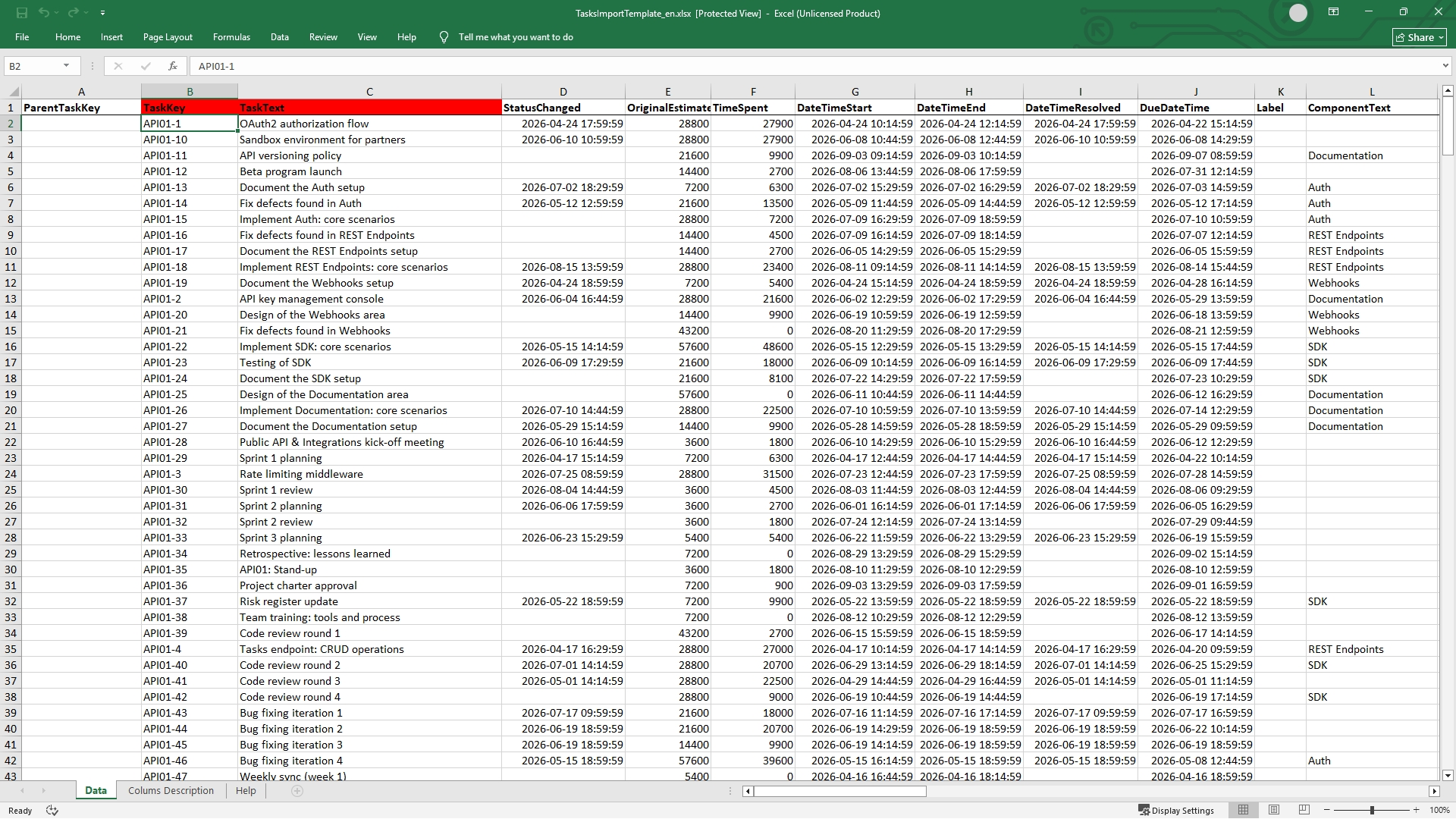
Excel Templates
Prepare data for accurate import
Excel templates help you enter data in the required structure and reduce the risk of errors during import. Templates are available for users, projects, tasks, timesheets and personal account data. Download the required template, fill it in according to the example and upload it to Weenvo. The system will validate the file before importing the data.
Features
Quick Start with Weenvo
Transfer users, projects, tasks and work data to Weenvo without lengthy manual setup.
Control Over Results
File validation before import and operation logs help you track import and export results, identify errors and ensure data is transferred correctly.
Convenient Data Analysis
Export data to Excel to prepare reports, reconcile information, analyse business data and transfer information to other systems.
Less Manual Work
Importing and updating data helps you quickly process large volumes of information without having to edit each record manually.
Need to Automate Data Exchange?
The Weenvo API helps you set up regular data exchange between Weenvo and external services. Use it to automate work with users, projects, tasks and timesheet data, and keep information up to date without manual uploads.
FAQs
Can I transfer data from another system to Weenvo?
What data can I transfer to Weenvo?
Is import suitable for transferring large volumes of data?
Do I need to create users, projects and tasks manually after switching to Weenvo?
What if the data in the source system has a different structure?
Can I update data that is already in Weenvo?
How can I check that the data was transferred correctly?
Can I export data from Weenvo?
When should I use the API?
Ask a Question
Specify the details of how you plan to use our solution suite or any individual product.
If your organisation has unique processes and requires an Enterprise‑level implementation, you can also submit a request for a customised setup that supports more efficient workflows.