Employee Onboarding Software and Self-Service for HR
Weenvo is employee onboarding software for small and mid-sized companies that run onboarding, leave and surveys by email. Onboarding is a project whose task list comes from an Excel template, with tasks for IT, the manager and HR; every employee has an account for hours, leave and payslips; surveys run through Forms; HR documents are open by role.
Key benefits
Onboarding from a template
An onboarding template is a project scheme with the onboarding task types, statuses and fields, plus the task list loaded from the Excel template with owners and due dates. HR creates the project for each new hire, and the tasks land with IT, the manager and HR on day one.
Employee self-service
The employee personal account is each person’s own page with working hours, leave, payslips, documents and goals. Leave balances and payslips stop being questions to HR.
Surveys built in
Onboarding feedback on day 30, the engagement survey, the exit survey: each is a form with several question types, sent to a person or a group, with a results overview and Excel export.
HR documents by role
The handbook, the policies and the contract templates are documentation pages with access per section and a version on every edit. The handbook is open to everyone; the HR procedures only to HR.
A new hire’s first month, run from Weenvo
A professional-services company with several departments and no HR system beyond payroll hires a new analyst. HR runs the first month like this.
The day the offer is signed
HR creates a project from the onboarding template in Projects and tasks. The task list is loaded from the Excel template with owners and due dates counted from the start date: laptop and accounts for IT, the first-week plan for the manager, the contract and the policies for HR, the handbook to read for the new hire. The board shows the whole run; the calendar shows what is due before the start date.
The week before
IT closes the accounts task and the laptop task. The manager writes the first-week plan into the task. HR loads the new hire into the staff list, either by hand or with the rest of the month’s hires through the Excel template, and the personal account exists before the first day.
Day one
The new hire logs in once and works in every Weenvo application: the onboarding board with their own tasks, the handbook and the policies in Documentation in the sections their role may see, their personal account with working hours and leave.
Week two, a request
The new hire needs an employment certificate for a bank. They submit the request through the HR form; HR creates a task on the HR board with the form attached and a deadline, closes it when done, and nobody searches a mailbox. Leave requests follow the same path.
Day 30
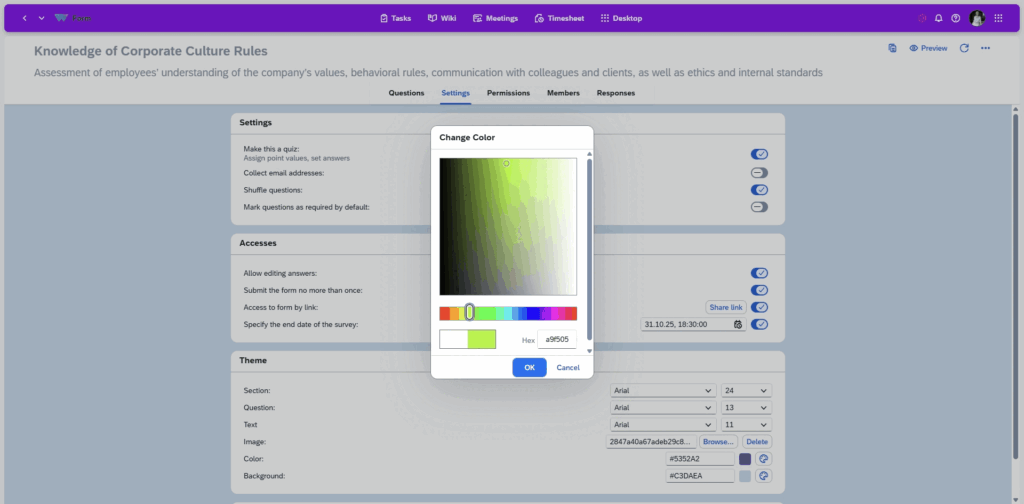
The onboarding feedback survey goes to the new hire and to the manager through Forms. HR reads the results overview, sees who answered and what, and exports the month’s answers to Excel. Two answers change the template: the first-week plan task gets a checklist, and the policies task moves earlier.
Every month
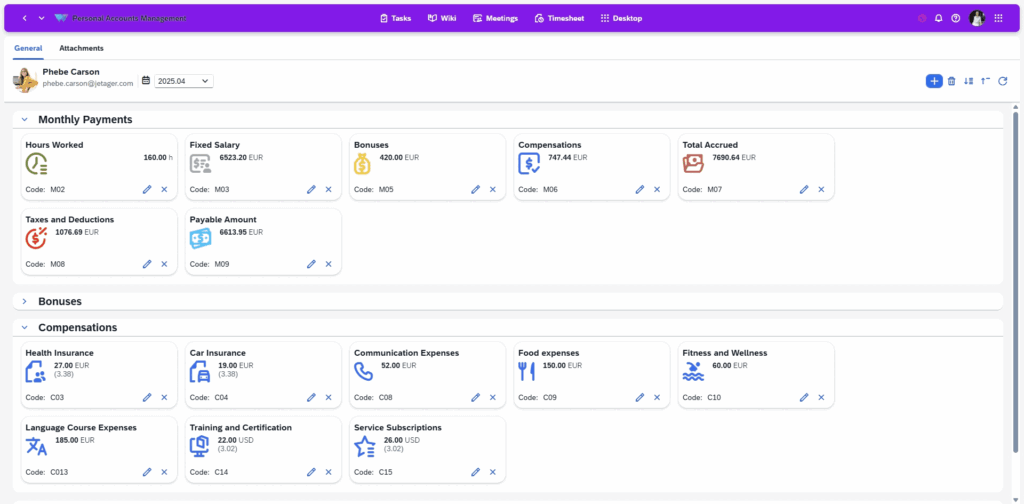
The payroll figures HR wants employees to see are imported from Excel into the personal accounts; each employee reads their own payslip and leave balance there.
Every quarter
The engagement survey goes to the whole company. When someone leaves, the exit survey goes out the same way, and the answers sit next to the other HR results.
Use cases
Onboarding
A project per new hire with its task list from the Excel template, tasks for IT, the manager, HR and the new hire, deadlines on the calendar.
Leave and documents self-service
Working hours, leave, payslips and documents in each employee’s own account. See employee personal account.
Engagement survey
A form to the whole company or one team, results per respondent, Excel export. See forms and surveys.
HR requests through a form
Certificates, leave and changes of details requested through a form, each one tracked as a task with the form attached, a status and a deadline on the HR board. See service desk in Weenvo and company knowledge base.
What HR stops doing by email
A project with its task list from the Excel template, tasks assigned to IT, manager and HR
Instead of: An onboarding checklist in a spreadsheet, chased by email.
The employee personal account
Instead of: Leave balances and payslips sent on request.
Documentation with access per section and versions
Instead of: Policies in a shared drive nobody can find.
Forms with a results overview and Excel export
Instead of: Feedback surveys in a separate tool.
A form attached to a task with a deadline
Instead of: Requests to HR in a mailbox.
Weenvo applications
Employee personal account
Salary and hourly rate, payments and bonuses, working hours, sick leave and holiday, job description, goals.
Projects and tasks
Onboarding and other HR processes as projects with task lists from Excel templates; the HR request board.
Forms and surveys
Onboarding feedback, engagement and exit surveys; the HR request form.
Documentation
The handbook, policies and templates with access per section and version history.
Data import and export
The staff list and personal-account data from Excel.
Calendar
Onboarding deadlines and HR meetings on one view.
Cost
Free: up to 10 users with every feature. Standard: €10 per user per month, 10 GB of storage, 15% off on annual billing. A company of 120 employees, each with a personal account, pays €1,020 a month on annual billing or €1,200 billed monthly. Full details on the pricing page. Last checked 2 November 2026.
Free
0 EUR per user per month
- Up to 10 users
- 50 MB storage
- Every feature
- No credit card
Standard
10 EUR per user per month
- 10 GB storage
- Every feature
- 15% off on annual billing
See Weenvo in Action
Want to see how these features work in practice? Explore how Weenvo can help your business.
FAQs
Can we run onboarding as a template?
Yes. A project scheme fixes the task types, statuses and fields; the onboarding task list with owners and due dates is loaded from the Excel template for each new hire and adjusted where it differs.
Can employees see their own leave and payslips?
Yes. The personal account shows salary and hourly rate, payments, bonuses, working hours, sick leave and holiday: the data HR loads or enters.
Can we run employee surveys?
Yes. Forms support several question types and access by user or team, show who responded and how, and export to Excel.
Is Weenvo an HR system or payroll?
Weenvo holds the employee’s record and self-service account, runs the HR processes as projects, the surveys and the documentation, and imports payroll figures from Excel so employees see them. Payroll itself is calculated in the payroll system.
Can HR documents be restricted by role?
Yes. Documentation access is set per section, so the handbook is open to everyone and HR procedures only to HR.
Can we import employees from Excel?
Yes. Users and personal-account data are loaded through Weenvo’s Excel templates, with validation and a log of what was imported.
Ask a Question
Specify the details of how you plan to use our solution suite or any individual product. If your organisation has unique processes and requires an Enterprise‑level implementation, you can also submit a request for a customised setup that supports more efficient workflows.
Thank you for contacting us. Our support will answer you as soon as possible!