Project Management Software for Project Managers and PMO
Weenvo is project management software for project managers and small PMOs that run several client or internal projects at once. A project scheme sets the standard every project starts from; every task card shows planned against actual hours; the weekly timesheet is grouped by project manager; steering meetings turn decisions into tasks; and a survey closes each project.
Key benefits
One standard for every project
A project scheme is the set of task types, statuses, priorities and custom fields defined once and reused by every project created from it. Boards look alike, reports across projects make sense, and a new manager inherits the method instead of inventing one.
Planned against actual in the card
Every task carries an estimate and the time spent. The manager sees the overrun on the work package while it is happening, not in the month-end report.
Decisions become tasks
A steering meeting is a scheduled meeting with the client or the sponsor, with agenda items filed in advance, decisions recorded during the session and minutes sent afterwards. Each decision gets an owner and a date and appears on the project board.
Feedback at close
When a project closes, a project evaluation survey goes to the client and the team through Forms. The answers sit next to the project’s documentation, where the next proposal to the same client starts.
Several projects in parallel: a project manager’s week
A project manager in a service company runs a handful of projects for different clients, one of them internal, and reports to the head of a small PMO that keeps the method.
Monday, the week across all projects
The manager opens the calendar: tasks by owner and date across every project, meetings included. Two deadlines fall on the same Thursday, so one is moved now rather than discovered then. Each project has its own board in Projects and tasks, created from the PMO’s scheme: the same task types, statuses and custom fields everywhere, so switching between boards costs nothing.
Tuesday, estimates against actuals
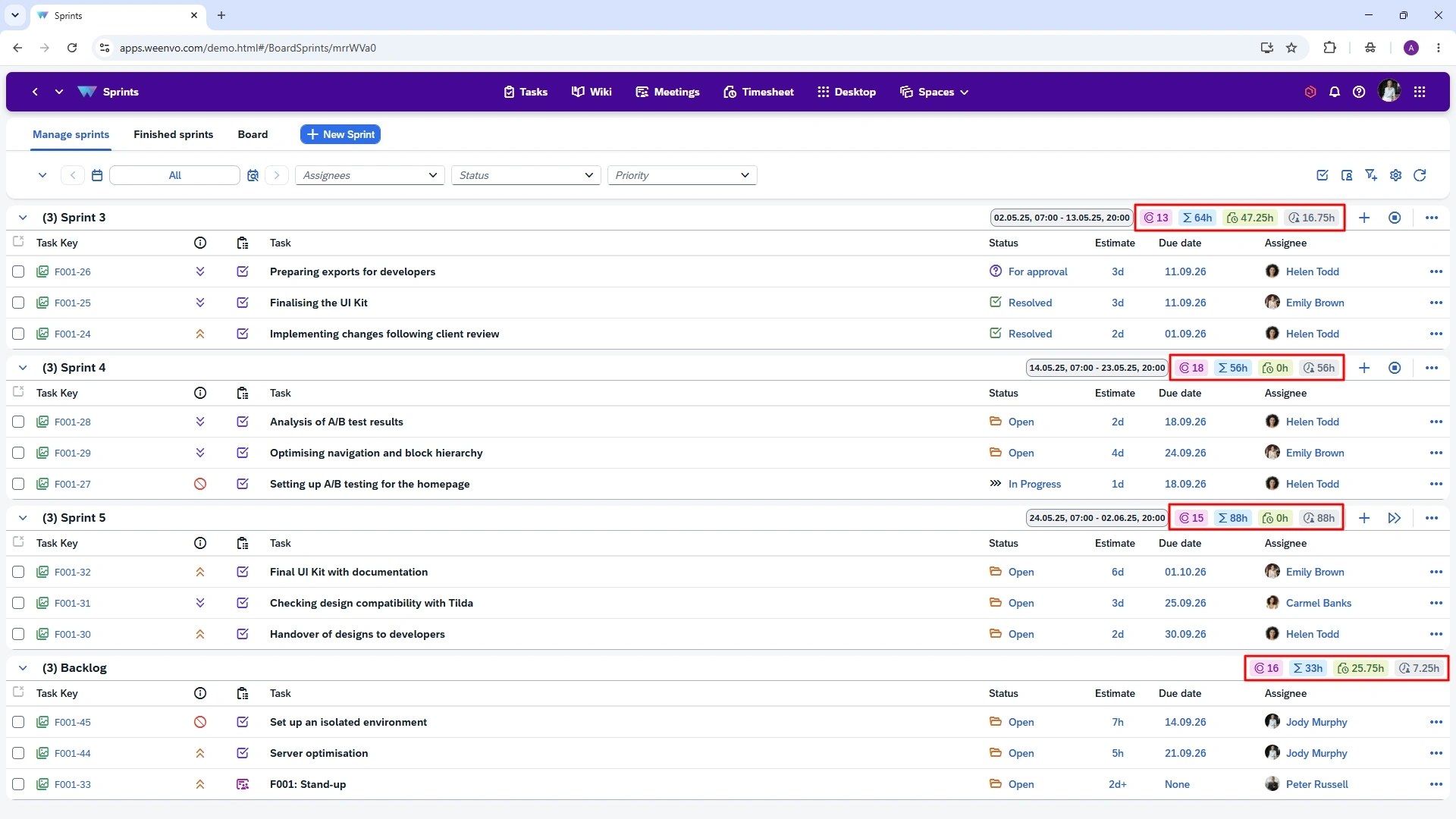
On the largest client project a task has passed its estimate with half the work left. The card shows it: estimate against time spent. The manager raises it with the client on Wednesday instead of explaining it at the invoice.
Wednesday, steering
The fortnightly steering meeting with the client runs in Meetings. Three agenda items were filed by their owners on Monday. Two decisions are typed in during the call, each with an owner and a date; both appear on the project board before the call ends. The minutes go to the sponsor the same afternoon, and the next steering opens with the status of these two decisions.
Thursday, the internal project
The internal project, a new reporting process for the back office, runs on the same kind of board as client work, with tasks for finance, IT and the managers who will use it. Nothing about it depends on who remembers the corridor conversation.
Friday, hours
The manager opens the weekly timesheet in Time tracking and timesheets grouped by project, returns one entry logged on the wrong project, accepts the rest. The PMO reads one report: hours by project manager across every project, planned against actual.
A routine process as a workflow
The same scheme mechanism runs the company’s routine processes. Purchase requests, contract reviews, equipment replacements: each is a workflow with its own statuses and task types, owners per step and a deadline on the calendar. The process that used to live in an email thread is a board.
Close-out
When a project closes, the evaluation survey goes to the client and the team. The project’s documentation, the charter, the decisions, the acceptance records, stays inside the project; the PMO’s standards stay above it in the documentation tree.
Use cases
Client project with steering
A board from the scheme, estimates per task, a steering meeting with decisions as tasks, minutes to the sponsor. See client projects in Weenvo.
Internal project across departments
Tasks for several departments on one board, the sponsor’s view without a status deck. See Weenvo for company leaders.
A routine process as a workflow
Purchase requests, contract reviews or equipment replacements with their own statuses, owners per step and deadlines on the calendar.
Project close-out with a survey
A project evaluation survey to the client and the team, results next to the project. See forms and surveys.
What the manager stops doing by hand
Estimate and time spent in every task, reports across projects
Instead of: A planning spreadsheet per project.
Weekly timesheet by project, accept or return
Instead of: Chasing hours by email.
Decisions typed into agenda items during the meeting, minutes sent
Instead of: Minutes written up after the call.
A workflow with its own statuses and owners per step
Instead of: A process described in a document nobody follows.
An evaluation survey at close, results next to the project
Instead of: A lessons-learned file nobody opens.
Weenvo applications
Projects and tasks
Schemes as the standard, boards, estimates per task, workflows for routine processes, sprints where the team wants them.
Time tracking and timesheets
Planned against actual, weekly approval, reports by project manager.
Meetings
Steering meetings with decisions as tasks and sent minutes.
Calendar
Tasks by owner and date across every project, meetings on the same view.
Forms and surveys
Project evaluation after each project.
Documentation
Standards above, project documents inside, versions on every page.
Cost
Free: up to 10 users with every feature. Standard: €10 per user per month, 10 GB of storage, 15% off on annual billing. A delivery team of 25 users on Standard pays €212.50 a month on annual billing or €250 billed monthly. Full details on the pricing page. Last checked 2 November 2026.
Free
0 EUR per user per month
- Up to 10 users
- 50 MB storage
- Every feature
- No credit card
Standard
10 EUR per user per month
- 10 GB storage
- Every feature
- 15% off on annual billing
See Weenvo in Action
Want to see how these features work in practice? Explore how Weenvo can help your business.
FAQs
Can we enforce one project structure?
Yes. A project scheme fixes task types, statuses, priorities and custom fields, and every project created from it inherits them. A PMO keeps one scheme per project type.
Can I see planned against actual hours per project?
Yes. Each task carries an estimate and the time spent, and time reports group them by project, project manager and period.
Do decisions from meetings become tasks?
Yes. A decision recorded against an agenda item becomes a task with an owner and a date on the project board, and the next meeting opens with its status.
Is there portfolio or resource planning?
Weenvo gives the manager time reports across projects, planned against actual, and the calendar with every task by owner and date. Capacity is read from those views and the Excel export.
Can I collect feedback after a project?
Yes. Project evaluation runs through Forms: a survey to the client and the team at close, with a results overview and Excel export.
How do we migrate from Wrike or Jira?
Export to Excel or CSV and import users, projects and tasks with Weenvo’s Excel templates, with validation and a log. The Jira comparison covers the feature-by-feature view.
Ask a Question
Specify the details of how you plan to use our solution suite or any individual product. If your organisation has unique processes and requires an Enterprise‑level implementation, you can also submit a request for a customised setup that supports more efficient workflows.
Thank you for contacting us. Our support will answer you as soon as possible!