Work Management for Public Sector Teams
Weenvo is work management software for public sector teams: agencies, municipalities and institutions that must show who decided what, when, and on which document version. Decisions are recorded with owner and date; documents keep every version with access by unit and role; programmes and grants are projects reported by stage; applications and requests through forms are tracked as tasks.
Key benefits
Decisions traceable to a meeting and an owner
A decision record is the entry in the minutes that states what was decided, by which meeting, who owns it and by when, and which document version it refers to. Minutes are archived with the meeting and found by search for an audit or an information request.
Documents with versions and role access
Version history keeps every edit of a regulation, procedure or tender file with the author and the date, and the earlier versions remain openable. Access is set per section, so a unit reads its own files and the institution-wide ones above them.
Programmes reported by stage
A programme or grant is a project with stages as task types, owners and deadlines. The oversight body’s report is the project by stage, read at any time rather than assembled before the deadline.
Requests through forms, with deadlines
An internal request or a citizen-facing application is submitted through a form, by link and with no account needed; the unit creates a task from each submission, with the form attached, its own statuses and a deadline on the unit’s board. The register of requests is the board.
A programme office’s reporting cycle
A programme office in a regional authority runs several funded programmes, each with grants to municipalities and organisations, and reports quarterly to the oversight body. In Weenvo the cycle runs like this.
Programmes as projects
Each programme is a project created from the office’s scheme in Projects and tasks, with stages as task types: call for applications, assessment, award, implementation, monitoring, closure. Each grant inside the programme is a task with an owner, a deadline and the fields the stage needs. The office’s workspace holds its programmes; the legal unit and finance have workspaces of their own with their own roles, and nobody sees a workspace they do not belong to.
Applications through forms
The call for applications is a form, shared by link, that applicants fill in without a Weenvo account. The office creates a task of type application on the programme’s board for each submission, with the form attached, in the status received and with the assessment deadline set from the call. The assessment officer moves it through assessed and recommended; the register of applications is the board, filtered by status, and nobody keeps a spreadsheet beside it.
The monthly steering meeting
The monthly steering meeting runs in Meetings. Agenda items are filed by their owners in advance with the document each item refers to attached from the library. During the meeting the secretary types in each decision with an owner and a date; the attendee list is part of the record. A decision to extend a grant’s implementation deadline becomes a task on the programme board with the new date, and the minutes go to everyone present the same day. When the oversight body asks in autumn why a deadline was moved in spring, the office opens the record: the meeting, the decision, the owner and the version of the grant agreement it referred to.
Documents
The programme regulations, the assessment procedure and the templates for grant agreements live in Documentation, one section per programme, with access per section. The legal unit edits the procedure; the previous version stays in the history with the date. The version sent to applicants with the call is still there when a complaint is reviewed.
Quarterly reporting
The oversight body’s report is the project by stage: how many grants in each stage, which deadlines were met, which decisions moved them. Hours logged on the programme’s tasks show what the administration of each programme costs. The export to Excel goes into the report template.
Public consultation
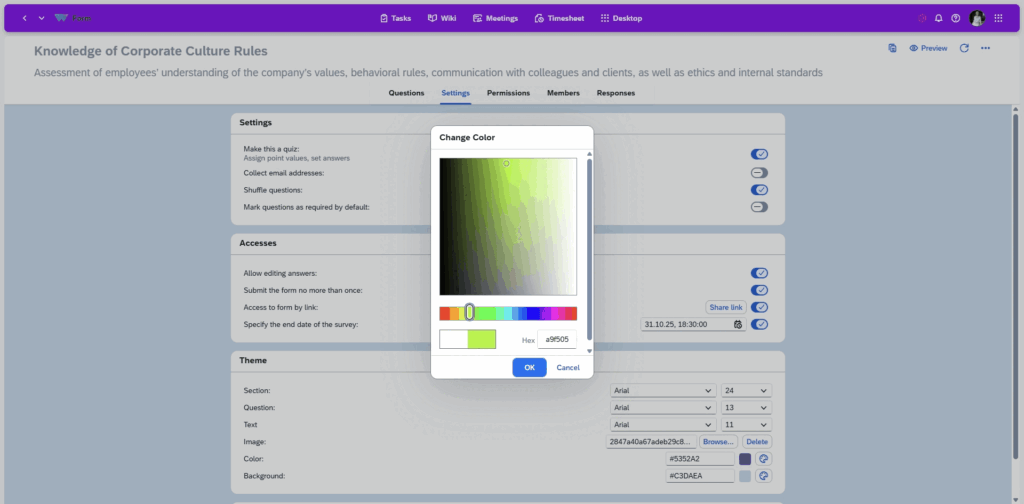
Before the next programme’s rules are set, a consultation survey goes out through Forms to the organisations that applied last time, by link. The results overview shows who answered and how; the export is attached to the proposal for the steering meeting.
Use cases
Council or board meetings
Agenda filed in advance, decisions recorded during the meeting, minutes archived and searchable. See meetings in Weenvo.
Grant programme
Stages as task types, applications through a form, each grant a task with an owner and a deadline, the report by stage. See projects and tasks.
Internal service requests
Requests from units through a form, a task created for each one with the form attached and a deadline on the service unit’s board, hours per request.
Public consultation survey
A form to residents or organisations by link, no account needed, a results overview, export for the report. See forms and surveys.
What this replaces
Decisions recorded in the meeting with owner, date and the document version
Instead of: Approvals in email threads.
One document with version history and access by unit and role
Instead of: A shared drive with several versions of one regulation.
Minutes written during the meeting, sent the same day, searchable
Instead of: Paper minutes typed up afterwards.
Forms attached to tasks with statuses and deadlines; the register is the board
Instead of: Spreadsheet registers of applications and requests.
Weenvo applications
Meetings
Councils, boards and steering meetings with agenda, attendees, decisions and minutes.
Documentation
Regulations, procedures and tender files with version history and access per section.
Projects and tasks
Programmes and grants as projects with stages, owners and reports.
Forms and surveys
Applications, internal requests and public consultations, each application attached to its task, each consultation a survey answer.
Company portal and workspaces
A workspace per unit or programme with its own roles; one login for all Weenvo apps.
Time tracking and timesheets
Hours per programme and request for the administration cost.
Employee personal account
Working hours, leave and documents for each member of staff.
Cost
Standard is €10 per user per month with 10 GB of storage and 15% off on annual billing, with no minimum number of users. Enterprise, for 100 users or more, is priced on request with invoice billing for legal entities and storage from 100 GB. Every feature is on every plan. Full details on the pricing page. Last checked 2 November 2026.
Standard
10 EUR per user per month
- 10 GB storage
- Every feature
- 15% off on annual billing
Enterprise
On request
- 100 users or more
- 100 GB storage and above
- Unlimited change history
- Invoice billing for legal entities
See Weenvo in Action
Want to see how these features work in practice? Explore how Weenvo can help your business.
FAQs
Can decisions be traced to a meeting and an owner?
Yes. Each decision is recorded in the meeting where it was taken, with the agenda item, the owner, the date and the attached document version; the minutes are sent and kept with the meeting.
Do documents keep version history?
Yes. Every edit creates a new version with author and date; earlier versions can be opened or restored.
Can access be limited by role or unit?
Yes. Access is set per workspace and per documentation section, so a unit sees its own documents and a contractor or partner sees one workspace.
Is there one login for all Weenvo apps?
Yes. One login for all Weenvo apps is included on every plan, including Free.
Can Weenvo run on our own servers?
The published plans run in the cloud. An on-premise option is on the near-term roadmap; ask for the timeline when booking a demo.
Can we pay by invoice?
Yes. Legal entities are billed by invoice. Enterprise accounts for 100 users or more are priced on request and billed by invoice as well.
Can citizens submit applications through a form?
Yes. A form is shared by link and answered without a Weenvo account; the office creates a task from each submission with the form attached, its own statuses and a deadline, and the board is the register.
Ask a Question
Specify the details of how you plan to use our solution suite or any individual product. If your organisation has unique processes and requires an Enterprise‑level implementation, you can also submit a request for a customised setup that supports more efficient workflows.
Thank you for contacting us. Our support will answer you as soon as possible!