Project and Meeting Management for Education
Weenvo is project and meeting management software for universities, schools and training companies. Accreditation, programme launches and admissions are projects with task lists reused every year; councils keep minutes with decisions; a document library gives each role the regulations it may see; surveys of students and staff run through Forms. A department of up to 10 users starts free.
Key benefits
Committee decisions on record
Meeting minutes are the record of a meeting: who attended, which agenda items were discussed, which decisions were taken, by whom and by when. In Weenvo they are written during the meeting, sent to members afterwards and found by search years later.
The year’s projects, reused every year
Accreditation, a programme revision and the admissions campaign come back every year with the same stages. Each is a project created from the faculty’s scheme, with last year’s task list loaded from the Excel template, the deadlines moved and the owners updated.
Documents by role, with versions
A document library is one tree of regulations, curricula, syllabi and templates with access set per section. Teaching staff see the staff sections, administration its own; every edit keeps the previous version.
Surveys built in
Course evaluations and staff satisfaction surveys are created in Forms with several question types, sent to a group or shared by link, answered on a phone, and exported to Excel for the quality report.
A faculty’s academic year in Weenvo
A faculty with several departments and a few hundred staff runs the year in Weenvo like this.
September, the year’s projects
The faculty office creates this year’s projects from the faculty’s schemes in Projects and tasks and loads last year’s task lists from the Excel templates: the accreditation of one programme, the revision of two curricula, the admissions campaign for the next intake. Each has stages as task types and the dates on the faculty’s calendar: self-evaluation report by December, site visit in March, decision in June. Owners are heads of department and programme leads; each sees their tasks on their own calendar next to their teaching.
The faculty council
The council meets monthly in Meetings. Agenda items are filed by their owners a week before, with the document each item refers to attached from the library. During the meeting the secretary types in each decision with an owner and a date; the attendee list is part of the record. The minutes go to all members the same day and are filed with the meeting, so a question in May about a decision from October is answered by opening the record. A decision to change an assessment regulation becomes a task for the quality office with the deadline set.
The document library
Regulations, the curricula, every syllabus and the templates for course files sit in Documentation. The quality office edits a regulation; the previous version stays in the history with the date. Teaching staff see the staff sections, the admissions team its own, and the published regulations are the ones students are given.
Course evaluation
At the end of each semester a course evaluation survey goes to the students of every course through Forms, by link, with no account needed. The results overview shows who answered and how; the export goes into the quality report and into the accreditation self-evaluation.
Staff
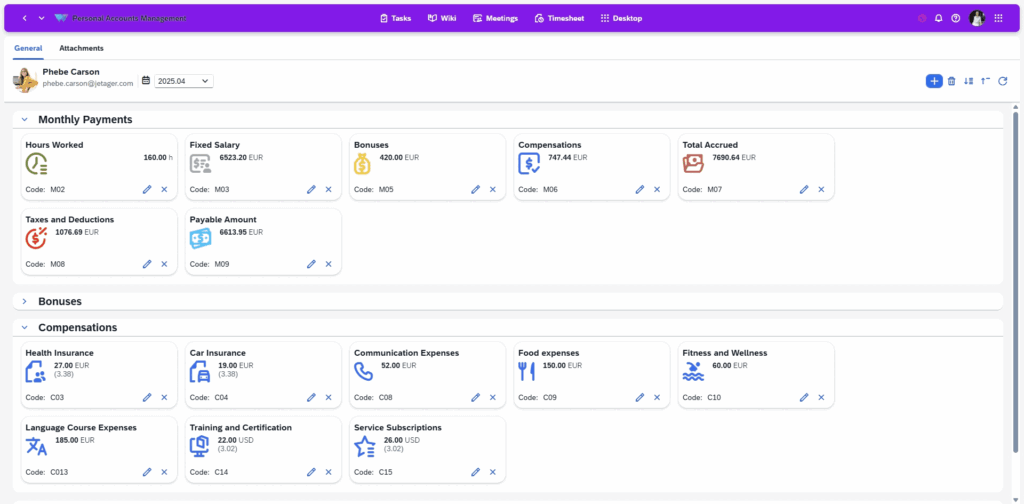
Each staff member has a personal account with working hours, leave and the documents that concern them, so the faculty office stops answering leave balance questions by email.
A training company
A commercial training company runs the same product differently: every course is a project from the course scheme, with tasks for materials, venue, trainer and follow-up. Trainers log hours in the task card, and the monthly report of hours by course is what trainer pay is calculated from. After each course a feedback form goes to the participants by link, and the results sit next to the course for the next sales conversation. A company with a handful of trainers runs it on the Free plan.
Use cases
Accreditation project
Stages as task types, the self-evaluation report in the library with versions, evidence attached to tasks, the site visit on the calendar. See documentation in Weenvo.
Faculty council or school board
Agenda filed in advance, decisions recorded during the meeting, minutes sent and archived. See meetings in Weenvo.
Course evaluation survey
A form per course, answered by students by link, results per respondent, export to Excel for the quality report. See forms and surveys.
Training company courses and trainer hours
A project per course, trainer hours in the task card, a monthly report by course, participant feedback after each course.
What this replaces
Decisions recorded during the meeting, minutes sent the same day and searchable
Instead of: Minutes written up from notes and circulated days later.
One document library with access by role and version history
Instead of: Regulations and syllabi in several shared folders.
Forms with a results overview and Excel export
Instead of: Paper or separate-tool surveys with results in a spreadsheet.
Each staff member’s own account with hours, leave and documents
Instead of: A spreadsheet of leave and working hours.
Weenvo applications
Meetings
Councils, committees and boards with agenda items, attendees, decisions and minutes.
Projects and tasks
Accreditation, programme revisions, admissions and courses as projects from reusable schemes.
Documentation
Regulations, curricula and syllabi with access per section and version history.
Forms and surveys
Course evaluations, staff surveys, participant feedback, results overview and export.
Employee personal account
Working hours, leave and documents for each staff member.
Calendar
Accreditation deadlines, council meetings and course dates on one calendar.
Time tracking and timesheets
Trainer hours per course for pay and reporting.
Cost
Free: up to 10 users with every feature, which covers a department or a small training company. Standard: €10 per user per month, 10 GB of storage, 15% off on annual billing. A faculty office with 50 users pays €425 a month on annual billing or €500 billed monthly. Full details on the pricing page. Last checked 2 November 2026.
Free
0 EUR per user per month
- Up to 10 users
- 50 MB storage
- Every feature
- No credit card
Standard
10 EUR per user per month
- 10 GB storage
- Every feature
- 15% off on annual billing
See Weenvo in Action
Want to see how these features work in practice? Explore how Weenvo can help your business.
FAQs
Can we run committee meetings with minutes?
Yes. Agenda items with owners are filed before the meeting, decisions are recorded during it, and the minutes are sent to members and kept with the meeting, where search finds them later.
Can we survey students and staff?
Yes. Forms support several question types, access by user or team, and a link that students answer without a Weenvo account; they show who responded and how, and export to Excel.
Can documents be restricted by role?
Yes. Each section of the document library has its own access, so staff and administration materials live in one tree and each role sees its own.
Is there a free plan for a department?
Yes. Up to 10 users get every feature with 50 MB of storage and no credit card.
Can staff see their own leave and documents?
Yes. The personal account shows each person’s working hours, leave and the documents attached to their record.
Does it work on phones?
Weenvo runs in the browser and is installed as a progressive web app (PWA) on Android, iOS and PC, so students answer surveys and staff read minutes on the phone.
Can we import the staff list from Excel?
Yes. Users, projects and tasks are loaded through Weenvo’s Excel templates, with validation and a log of what was created.
Is Weenvo a learning management system?
Weenvo runs the administration around teaching: projects, meetings, the document library, surveys and staff records. Courses, grading and timetables stay in the institution’s LMS.
Ask a Question
Specify the details of how you plan to use our solution suite or any individual product. If your organisation has unique processes and requires an Enterprise‑level implementation, you can also submit a request for a customised setup that supports more efficient workflows.
Thank you for contacting us. Our support will answer you as soon as possible!