Weenvo is a monday.com alternative for teams that want sprints, time tracking and timesheet approval in one product. monday.com sells sprints in monday dev, time tracking from the Pro plan and lists no timesheet approval. Below: where the boundaries are, what they cost for 30 seats, and when monday.com is still the right choice.
monday.com is the easiest tool in this category to shape with your own hands: boards, columns, views and dashboards bend to whatever process a team already runs, and the result looks good enough that people keep using it. What the trial does not show is how much of the work you had in mind sits outside the product you are trialling. Sprints belong to monday dev. Time tracking starts on the Pro plan. A client-facing service desk is monday service, with its own price list. This article measures those boundaries, puts a price on them for a 30-seat team, and names the cases where monday.com is still the right call.
What monday.com does well
Configuration is the whole point. A team lead with no technical background can build a board with status, people, date and formula columns, add a timeline view and a dashboard, and have something usable in an afternoon. Automations are written as plain sentences ("when status changes to Done, notify the owner"), which is why operations teams adopt them without training.
Docs are native: even the Free plan carries three of them, and every paid plan has them. Guests join from the Standard plan up, viewers are free from Basic, and the 2026 plans ship with AI credits included: 1,000 a month on Basic, 2,000 on Standard, 3,000 on Pro.
If your work is a process you want to see on one screen and adjust often, monday.com is a very good choice.
Which monday.com features are a second product or a higher plan?
monday.com sells work management, dev, CRM and service as separate products. The pricing page lists all of them side by side, so nothing is hidden; the cost appears when a team’s needs cross a boundary.
Sprints are in monday dev, not in work management
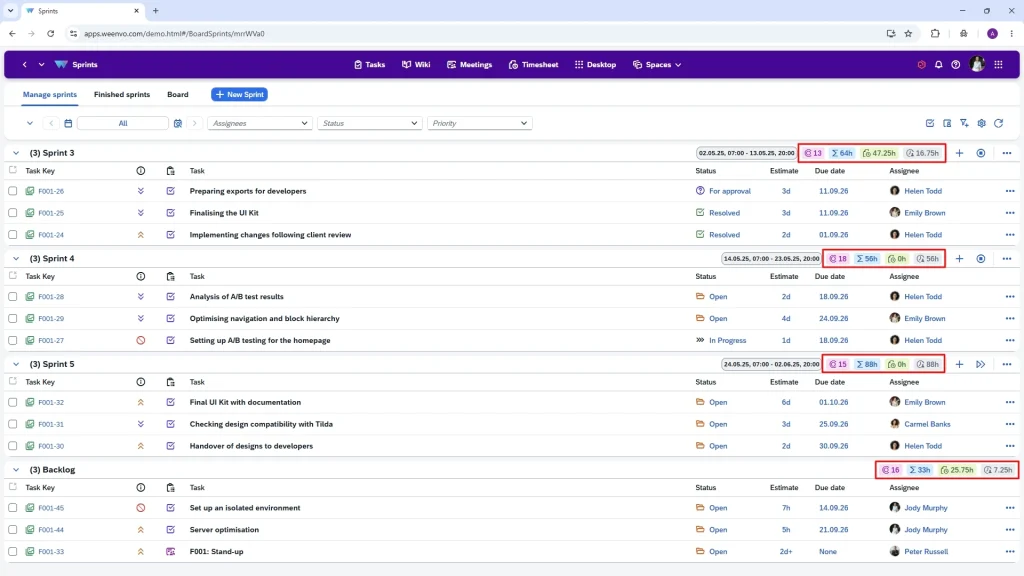
The work management pricing page does not mention sprints. Sprint management "using story points" is available in monday dev from the Basic plan, €9 per seat per month on annual billing — on top of the work management seat an engineer may already have. A 10-person engineering team that wants backlogs and sprints in monday therefore buys a second product.
Does monday.com have time tracking and timesheet approval?
The time-tracking column is a Pro feature (€19 per seat per month, annual). It records hours against an item. Nothing on the pricing or product pages mentions submitting a timesheet, approving it, returning it for correction, or applying a user’s rate to the hours. A team that invoices clients for hours gets the raw numbers and builds the review step elsewhere.
Automations are metered
Standard includes 250 automation actions and 250 integration actions a month; Pro raises both to 25,000; Enterprise goes up to 250,000. Fine for a small team. A busy board with a few "notify" and "move item" recipes can use 250 actions in a week, which is often the real reason teams move from Standard to Pro.
Feature comparison
Text in the cells says what the official pages say. "Pro", "Standard" and "Enterprise" are monday work management plans; "monday dev" means a second product.
Tasks, projects and sprints
| Capability | monday.com | Weenvo |
|---|---|---|
| Boards, items, subitems, dependencies | Yes | Yes, subtasks with unlimited nesting |
| Kanban, timeline, calendar views | Yes (timeline and calendar from Standard) | Yes |
| Sprints with backlog, start and close | monday dev, all plans (from Basic, €9) | Yes, native; unlimited sprints and boards on every plan |
| Reusable project set-up | Templates | Project schemes: task types, statuses, priorities, custom fields |
| Automations | 250 actions a month on Standard; 25,000 on Pro | Default values and workflow states; no action metering |
Time and timesheets
| Capability | monday.com | Weenvo |
|---|---|---|
| Native time tracking | Pro and above | Yes, all plans |
| Timesheets with approve or return | Not listed on official pages | Yes, all plans |
| Time logged against meetings | No meeting object | Yes |
| Timesheet views by day, week, month | Not listed | Yes |
| Grouping by user, project, client, project manager | Not listed | Yes |
Documents, meetings, forms
| Capability | monday.com | Weenvo |
|---|---|---|
| Documents | workdocs; 3 on Free, included on paid plans | Documentation with nested sections, tabs, version history |
| Meeting with agenda, decisions and minutes | AI meeting notetaker on paid plans; no meeting object with agenda and decisions | Yes: roles, agenda items with owners, decisions, minutes e-mailed to participants |
| Forms | WorkForms | Yes, all plans |
| AI | Credits included on every paid plan | Not offered |
Admin, portal and billing
| Capability | monday.com | Weenvo |
|---|---|---|
| Workspaces for teams, clients or contractors | Yes; multi-level permissions on Enterprise | Yes, unlimited, with own menus and roles |
| Client service desk | monday service (Standard €31 per seat) | No service desk; a client can get an isolated space with its own projects and access rights |
| Single sign-on | Google sign-in from Pro; SAML (Okta, OneLogin, Azure AD) on Enterprise | Not available |
| Employee personal account (pay, leave, goals) | No | Yes |
| Seat rules | Plans start at 3 seats; quote above 40 | Free up to 10 users; Standard from 10 users |
| Import and export | Excel and CSV import | Excel templates for users, projects, tasks, timesheets; API on every plan |
Checked on 21 October 2026 against monday.com/pricing, monday dev pricing, monday service pricing and weenvo.com/price. monday’s support articles were not readable by our tools that day, so limits that live only there are marked "not listed". Re-check before you buy.
What it costs for a team of 30
Annual billing, 30 seats. monday.com publishes its prices in euros, so no conversion is needed. Weenvo Standard is €10 per user per month with the 15% annual discount applied.
| Set-up | Per year | Per month |
|---|---|---|
| monday work management Standard (no time tracking) | €4,320 | €360 |
| monday work management Pro (time tracking, no approval) | €6,840 | €570 |
| monday Pro + monday dev Basic for 10 engineers | €7,920 | €660 |
| Weenvo Standard (time tracking, timesheet approval and sprints included) | €3,060 | €255 |
Standard is 1.4 times the price of Weenvo and still has no time tracking. Pro, the plan most teams end up on, is 2.2 times. Add sprints for the engineers and it is 2.6. monday notes that prices exclude tax and vary by billing country.
How it works in practice: a 20-person software agency
Picture a software agency: twenty people, six developers, four client projects, hourly invoicing. In Weenvo each client has a workspace; inside it, the project board runs two-week sprints with a backlog, and the developers log hours in the task card as they close items. On Friday the project manager opens the week’s timesheet grouped by client, returns one entry with a question, accepts the rest. The sprint review is a meeting in Weenvo: agenda items with owners, decisions typed during the call, minutes e-mailed to the client, the hour logged against the meeting. The monthly timesheet by project is the invoice draft.
In monday.com the same agency runs client boards in work management Pro, buys monday dev Basic for the six developers, tracks hours in a Pro column, and takes the approval step to a spreadsheet or a marketplace app. The boards will look better than ours. There will be more of them.
When monday.com fits better
- The process changes every month and the team wants to redraw it itself. monday’s board model is more flexible than Weenvo’s project schemes.
- The team already lives in the monday ecosystem — CRM, service desk, dev — and wants one vendor.
- The team wants AI inside the tool today, with credits included in the plan. Weenvo does not offer AI features.
- Nobody bills hours and nobody runs sprints. Then work management Standard is good value.
Verdict by team type
| Team | Pick |
|---|---|
| Operations or marketing team that builds its own boards | monday.com Standard or Pro |
| Agency or services team that invoices hours | Weenvo |
| Product team that runs sprints and tracks time | Weenvo (one product) |
| Company that wants CRM, service desk and work management from one vendor | monday.com, several products |
| Up to 10 people on a zero budget | Weenvo Free (every feature, 50 MB); monday Free stops at 2 seats |
FAQ
Does Weenvo need a separate product for sprints?
No. Sprints, backlogs and boards are part of the same product on every plan, including Free.
Does Weenvo meter automations?
No. Weenvo standardises work through project schemes, default task values and workflow states rather than per-action recipes, so there is nothing to count. If your process depends on many "when X then Y" rules, test it in the demo first.
Can a client get their own space in Weenvo?
Yes. A workspace with limited roles shows the client only its own projects and documents.
Is there a seat minimum?
Free covers up to 10 users; Standard starts at 10 users and is priced per user. The Free plan includes every feature except custom domains, with 50 MB of storage.
Can Weenvo be self-hosted?
The published plans are cloud. Enterprise is priced on request; ask about deployment options when you book a demo.