Weenvo is an Asana alternative for teams that track and bill hours: time tracking, timesheet approval, sprints and meetings are on every plan, including Free. Asana is easier to roll out, but time tracking needs the Advanced plan and timesheets a paid add-on. Below: features, cost for 30 users, and when Asana is still the better pick.
Asana is one of the easiest work management tools to roll out: people who are not project managers keep it up to date, and that alone puts it ahead of most rivals. The cost shows up later, when a team asks for the next thing. Time tracking lives on the Advanced plan. Timesheets are a separate add-on. Sprints are a convention you maintain yourself. This article measures where those gaps are, what they cost for a 30-person team, and where Asana is still the better pick.
What Asana does well
Asana’s strength is adoption. Task lists, boards, timelines and calendars share one data model, so a marketing team and an engineering team can look at the same work in different views without anyone re-entering it. Rules automate the routine: Starter already includes unlimited rules, and Advanced adds a custom rule builder with conditional logic.
Portfolios and Goals (Advanced and above) connect projects to company objectives, and the Workload view shows who is over capacity. In 2026 Asana also closed an old gap: Pages (formerly Notes) gives it a native document for meeting minutes and project documentation, so notes no longer have to live in another tool.
For a team that coordinates campaigns, launches or operations work, this is a complete product.
Which Asana features need a higher plan or an add-on?
Asana’s price list grows in three places. None of them is hidden; they are simply easy to miss during a trial.
Does Asana include time tracking and timesheets?
Asana’s own answer is short: time tracking "comes with the Advanced plan and above". On Personal and Starter, hours are tracked through third-party integrations.
Timesheets go one step further. The "Timesheets and Budgets" add-on brings timesheet submission and approval, billable and non-billable hours, user rates per project and project budgets. It is licensed per user, bought on top of any paid plan, and its price is not published. A team that bills clients by the hour therefore pays for a paid plan, from Starter, plus the add-on, and still finds out the second figure only from sales.
Sprints are built from parts
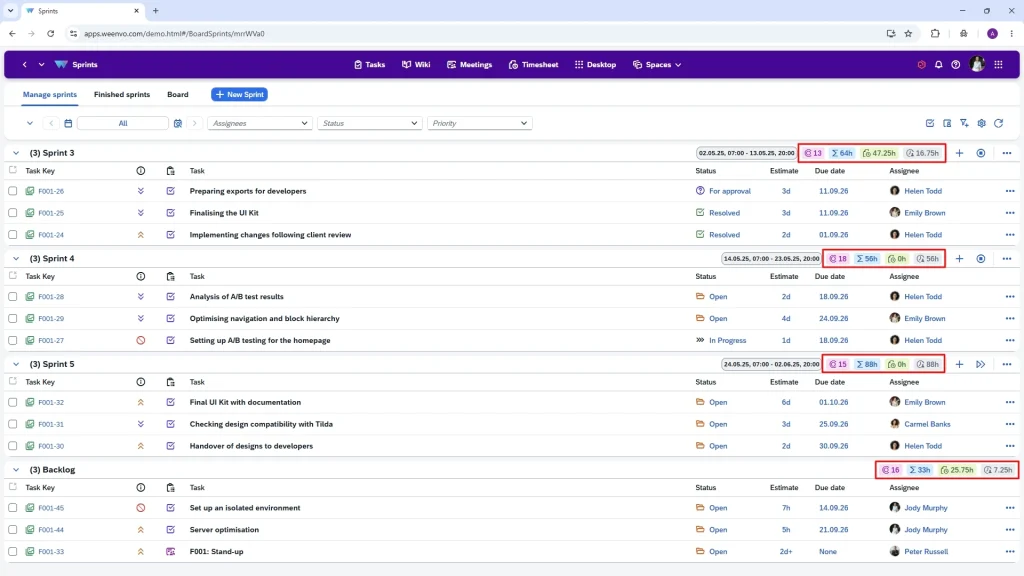
Asana describes its agile setup as a template-based workflow: a Board view for the sprint, a custom number field for story points, rules to move tasks, saved views for the backlog. It works. It is also a convention the team has to keep consistent across projects, because there is no sprint object to open, start and close.
Meetings have no home
There is no meeting, agenda or minutes object in Asana. Agendas are task templates, minutes go into Pages, and a Zoom integration adds the call link. Time spent in a meeting is not logged anywhere unless someone creates a task for it.
Feature comparison
Text in the cells says what the official pages say. "Higher tier" means the feature exists but not on the entry paid plan.
Tasks, projects and sprints
| Capability | Asana | Weenvo |
|---|---|---|
| Tasks, subtasks, dependencies | Yes | Yes, subtasks with unlimited nesting |
| Kanban and list views | Yes | Yes |
| Sprints with backlog, start and close | Built from templates and fields | Yes, native sprints; unlimited sprints and boards on every plan |
| Reusable project set-up | Templates and bundles (bundles on Enterprise) | Project schemes: task types, statuses, priorities, custom fields |
| Portfolios and goals | Advanced and above | Project categories and reports; no separate goals object |
Time and timesheets
| Capability | Asana | Weenvo |
|---|---|---|
| Native time tracking on tasks | Advanced and above | Yes, all plans |
| Timesheets with approve or return | Timesheets and Budgets add-on, price on request | Yes, all plans (timesheet approval) |
| Time logged against meetings | No | Yes |
| Timesheet views by day, week, month | Add-on | Yes |
| Grouping by user, project, client, project manager | Add-on | Yes |
Documents, meetings, forms
| Capability | Asana | Weenvo |
|---|---|---|
| Documents and wiki | Pages | Documentation with nested sections, tabs, version history |
| Meeting with agenda, decisions and minutes | No; Pages and task templates | Yes: roles, agenda items with owners, decisions, minutes e-mailed to participants |
| Forms | Starter and above | Yes, all plans |
| Branching logic in forms | Advanced and above | Not stated on public pages |
| AI assistants | Included, 5 requests per user per month on Starter and Advanced | Not offered |
Admin and portal
| Capability | Asana | Weenvo |
|---|---|---|
| Single sign-on | Google and Microsoft SSO from Starter; SAML on Enterprise | Not available |
| Workspaces for teams, clients or contractors | Teams within one organisation | Yes, unlimited, with own menus and roles |
| Employee personal account (pay, leave, goals) | No | Yes |
| Guests | Unlimited free guests on Starter and above | Workspace roles |
| Import and export | CSV import; export per project | Excel templates for users, projects, tasks, timesheets; API on every plan |
Checked on 21 October 2026 against asana.com/pricing, asana.com/plan/advanced, Timesheets and Budgets, agile management and weenvo.com/price. Vendors change plans often; re-check before you buy.
What it costs for a team of 30
Annual billing, 30 users. Asana publishes prices in euros for EU buyers; prices vary by billing country. Weenvo Standard is €10 per user per month with the 15% annual discount applied.
| Set-up | Per year | Per month |
|---|---|---|
| Asana Starter (no native time tracking) | €3,956 | €330 |
| Asana Advanced (native time tracking, no timesheets) | €8,996 | €750 |
| Asana Starter + Timesheets and Budgets | €3,956 + add-on, price not published | — |
| Weenvo Standard (time tracking, timesheets and timesheet approval included) | €3,060 | €255 |
Starter costs 1.3 times Weenvo. The difference opens when the team needs hours: Advanced is 2.9 times the price of Weenvo before the timesheets add-on is counted. Taxes and billing terms vary; the final figure may differ.
How it works in practice: a 12-person agency
Take a design agency with twelve people, three clients and hourly billing. In Weenvo, each client gets a workspace with its own projects, so the client sees only its own boards. Designers log time inside the task card as they work; a project manager opens the timesheet for the week, grouped by client, and either accepts it or returns it with a comment. The Friday review with the client is a meeting in Weenvo: agenda items with owners, decisions written down during the call, minutes e-mailed to everyone afterwards, and the hour itself logged against the meeting. At the end of the month the timesheet, grouped by project, is the invoice draft.
In Asana the same agency needs a paid plan plus the Timesheets and Budgets add-on for timesheets, approval and rates, Pages for the minutes, and a task per meeting to capture the hour. Each piece works. There are simply more of them.
When Asana fits better
- The team does not measure work in hours. Campaign, product and operations teams rarely need timesheets, and Asana’s Starter plan is strong value for them.
- The team relies on a wide integration marketplace. Asana connects to hundreds of tools; Weenvo offers Excel import and an API, not a marketplace.
- The team wants AI inside the tool today. Asana ships AI Teammates and AI Studio with published limits; Weenvo does not offer AI features.
- Goals and portfolios are central to how leadership reviews work, and the team is already on Advanced.
Verdict by team type
| Team | Pick |
|---|---|
| Marketing or operations team, no hourly billing | Asana Starter |
| Agency or professional services team that bills hours | Weenvo |
| Product team that wants sprints without configuring them | Weenvo |
| Organisation that needs SAML and an integration marketplace | Asana Enterprise |
| Up to 10 people on a zero budget | Weenvo Free (every feature, 50 MB) or Asana Personal (2 users) |
FAQ
Does Weenvo charge extra for timesheets?
No. Logging time, approving or returning timesheets and viewing them by day, week, month or sprint are part of every plan, including Free.
Can one task have several assignees in Weenvo?
Weenvo assigns one person per task and uses subtasks and watchers for everyone else. Watchers get updates and can be added from other projects.
Is there anything like Asana’s Rules?
Weenvo standardises work through project schemes, default task values and custom workflow states rather than a general rules builder. If your process depends on dozens of automations, test that in the demo first.
What are the Free plan limits?
Up to 10 users and 50 MB of storage, with every feature enabled except custom domains, and one month of change history. Standard raises storage to 10 GB and history to one year.
Can Weenvo be self-hosted?
The published plans are cloud. Enterprise is priced on request; ask about deployment options when you book a demo.