Workflow management is the practice of defining how a piece of work moves from request to result: which stages it passes through, who owns each stage, what must be true before it moves on, and by when. It is not automation software: a workflow exists as soon as two people agree on the order of steps and who does which.
Workflow, process, project: what is the difference?
The three words are used as if they were one. They are not, and the difference decides which tool and which habits a team needs.
| Term | What it is | Repeats? | Example |
|---|---|---|---|
| Process | The whole way an outcome is produced, end to end, often across departments | Yes, continuously | How the company takes a client from first call to signed contract |
| Workflow | One concrete, repeatable sequence of steps inside a process, with owners and handovers | Yes, each time a new request comes in | Reviewing and approving a proposal before it goes out |
| Project | A one-off piece of work with a start, an end and a goal | No | Launching the new website by March |
A project uses workflows: the design-review workflow runs ten times during the website project. A process contains many workflows. Workflow management is about the middle row: making the repeatable sequence visible, assigning it, timing it and measuring it.
What a workflow consists of
Every workflow a manager can rely on has the same five parts. If one is missing, the work still happens, but nobody can say where it is.
Stages
The states a piece of work passes through from start to finish. "New", "In review", "Approved", "Done" is a workflow of four stages. The test of a good set of stages: a person looking at the board knows what is happening to the item without opening it.
Roles and responsibilities
Who does the work at each stage, who approves it, and who is accountable for the final result. One owner per stage. When two people own a stage, each assumes the other has it.
Handover rules
What has to be true before a task moves to the next status. "A proposal moves to Approved only when the account manager has attached the signed estimate." Handover rules are where most delays hide: the rule exists in someone’s head, and the item waits until that person is asked.
Deadlines
The final date, and the time allowed at each stage. A workflow with only a final deadline looks fine until the week before it. Stage limits show the slip when it starts.
Monitoring
Where each task is now, how long it has been there, and where tasks pile up. Without this view, a manager learns about a bottleneck when a client calls. The article on finding bottlenecks on a Kanban board shows what this view looks like in practice.
Workflow management by company size
The term means something different at 10 people and at 250. The idea stays the same. What changes is where work gets stuck and what the manager needs to see. Below is what to expect at each size.
Up to 50 people
Workflows live in people’s heads and in chat. That works because everyone sits in the same room or the same channel, and a question gets answered in a minute. The cost is that nothing is written down: when a person is on leave, their workflows stop. At this size workflow management means writing the three or four recurring sequences down as stages on a board, naming an owner per stage, and resisting the urge to add tools.
51–250 people
Departments appear, and workflows start crossing them: sales hands over to delivery, delivery asks finance for an invoice, HR onboards someone that IT has to equip. Each handover between departments is where work waits longest, because neither side owns the gap. Workflow management at this size is mostly about the handovers: a shared system where the task moves from one department’s board to the next with its history, instead of an email that starts the story again. Timesheets begin to matter, because the manager can no longer see who is overloaded by looking around the room.
251+ people
Workflows have to survive the people who designed them. Standard sequences are defined once, as templates, and every new project or request starts from a template rather than from a blank board. Roles are tied to positions, not names. Reporting is by workflow and stage, not by asking team leads. The question is no longer "do we have workflows?" but "how many different versions of the same workflow do we run, and which one is right?"
Three examples of workflow management
Client onboarding in a 15-person agency
- A signed contract arrives; the account manager creates the client’s workspace and the onboarding task from the agency’s template.
- The account manager collects brand assets and access details from the client; the task stays in “Waiting for client” with a date.
- The project lead sets up the first project, assigns the team and adds the kick-off meeting to the calendar.
- The kick-off runs with an agenda; the decisions become tasks with owners.
- Finance confirms the billing details; the onboarding task closes, and the first sprint starts.
The owner changes twice. Without stages, the task can sit in step 2 unnoticed.
Bug fix in a software team
- Support logs the bug with steps to reproduce; it enters “Triage”.
- The team lead sets priority and assigns a developer; the task moves to “In progress”.
- The developer fixes it, logs the time spent and moves it to “In review”.
- A second developer reviews; the task either goes back with a comment or on to “Testing”.
- QA confirms the fix; the task moves to “Done”, and the release note is written from the task.
- Support tells the customer, with a link to the task.
The handover rule in step 4 is the whole point: nothing reaches testing without a second pair of eyes.
Leave request in HR
- The employee submits a request through a form; it creates a task in the HR project.
- The line manager approves or declines within two working days.
- HR checks the balance in the employee’s personal account and confirms.
- The calendar is updated; the team sees the absence.
- Payroll receives the record at month end, from the same system, without a second email.
Four owners, one record. The request is never "somewhere in the inbox".
What is a workflow management system?
A workflow management system is software that holds workflows as stages, owners, rules and deadlines, moves tasks between statuses, and shows where everything is. A spreadsheet can hold a workflow; it cannot move an item, notify the next owner or lock a stage until the rule is met.
Five functions a workflow management system must have:
- Configurable stages and task types. The team’s stages, not the vendor’s. A proposal and a bug do not pass through the same states.
- One owner per task and per status, visible without opening the task, with the change of owner recorded.
- Handover control. Required fields, checklists or approvals before a task moves on.
- Deadlines at task and status level, with the overdue ones visible on a board or calendar.
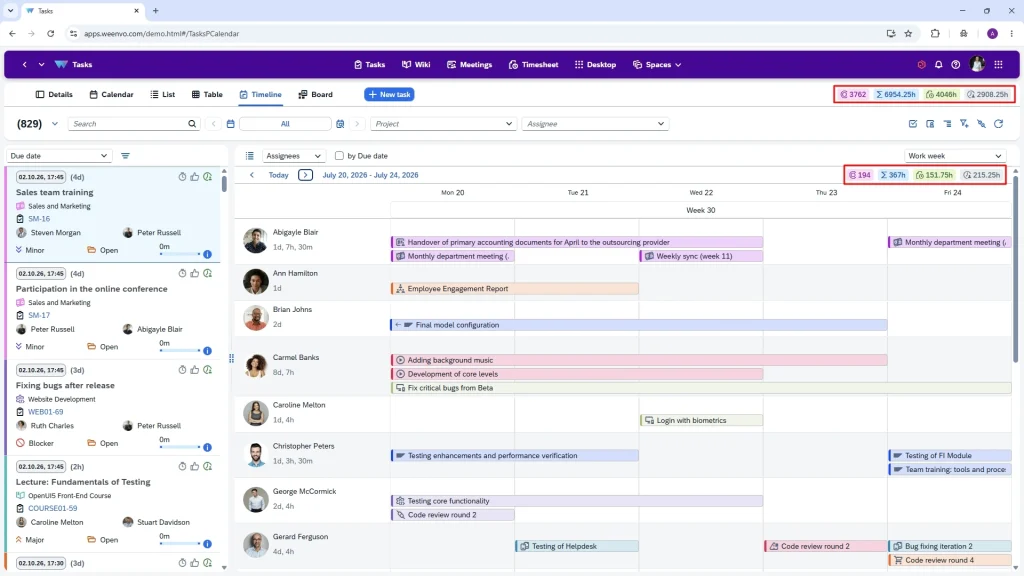
- Reporting by stage and owner. How many tasks are in each status, how long they stay, who is overloaded. If the system tracks time, the report also shows what each stage costs in hours.
The spreadsheet stops being enough at a recognisable moment: when someone asks "where is X?" and the answer requires a phone call. That usually happens between 10 and 20 people, or earlier if clients are involved in the workflow.
How Weenvo handles workflows
Weenvo keeps a workflow’s stages, owners, deadlines and time in one place, next to the documents and meetings the work produces.
- Project schemes define a team’s task types, statuses and default owners once; every project created from the scheme runs the same workflow. A 250-person company runs one onboarding workflow, not twelve.
- Boards show tasks by status with the owner on the card. Dragging a card to the next column is the handover.
- One assignee per task, subtasks for the parts other people do, and watchers for everyone who needs to know.
- Deadlines sit on the task and on the calendar, with dependencies between tasks.
- Time logged in the task turns into timesheets by project and person, so the manager sees what a stage costs, not only how long it took.
- Meetings record decisions with owners; a decision becomes a task in the same workflow without copying it anywhere.
- Forms start a workflow from outside the team: a request submitted by an employee or a client creates the first task.
Every feature is on every plan, including Free for up to 10 users, so a small team can set up its first workflows on the project and task management module without paying before it knows what it needs. Choosing the tool is its own decision; the guide on how to choose a task management system covers the mistakes companies make there. Start free and set up the first workflow.
FAQ
What is workflow management in simple terms?
Workflow management is agreeing the order of steps for a repeatable piece of work, who does each step, what has to be ready before the next step, and by when. Then watching where each task is. It is a way of running work, not a type of software.
What is the difference between workflow management and project management?
Project management plans and delivers a one-off goal with a start and an end. Workflow management runs the repeatable sequences that happen inside and around projects, such as review, approval, onboarding or a bug fix. A project manager uses workflows; a workflow does not need a project.
What is a workflow management system?
A tool that keeps each workflow as a set of statuses with owners, handover rules and deadlines, moves tasks through those statuses and shows where every task is. At minimum it needs configurable statuses, one owner per task, handover control, deadlines and reporting by status.
What are examples of workflow management?
Client onboarding in an agency, a bug fix moving from triage to release, a leave request going from employee to manager to HR to payroll, a proposal review before it reaches the client. Each has five or six steps and changes owner at least twice.
Is workflow management the same as BPM?
No. Business process management (BPM) looks at whole processes across the company, usually with modelling notations and automation engines. Workflow management is the practical layer underneath: one sequence, with owners and deadlines, that a team runs every day. Most companies under 500 people need the second and rarely the first.